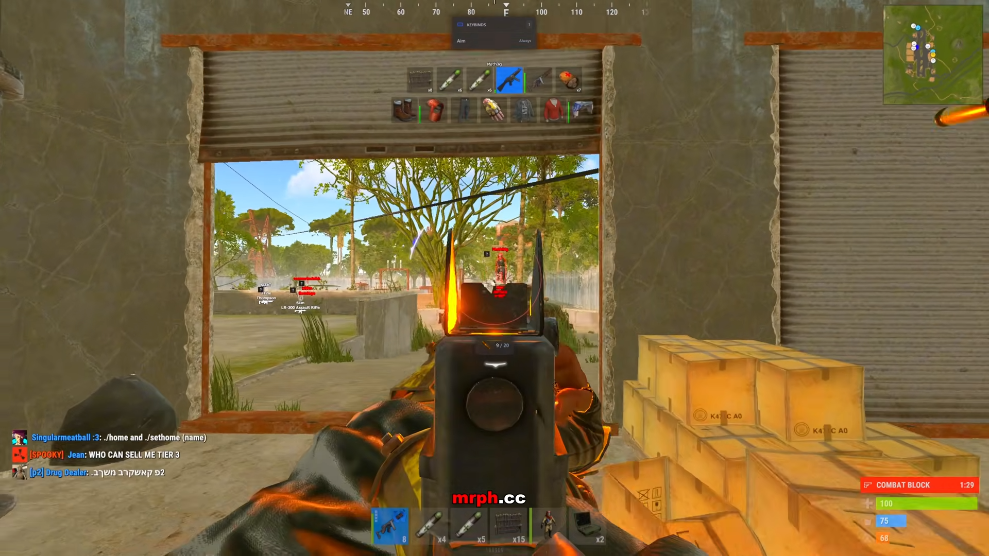
Rust Aimbot & Rust ESP: Features Compared
Understand Rust aimbot FOV, smoothing and aim bones, plus player ESP boxes, skeletons and filters.
Part of Rust Cheats & Rust Hacks: PC Feature Guide . Read the overview for the complete RUST toolkit.
What Rust aimbot settings describe
The reference lists an aimbot toggle, FOV slider, FOV circle, smoothing slider, custom aim bone and custom aim key. FOV defines a targeting region, while smoothing describes how targeting movement is presented. Aim bone selects a point on the target, and the key controls activation. These names do not establish a guarantee about accuracy or account safety.
What Rust player ESP displays
Player ESP includes box, skeleton, name, health, held item and weapon displays. Player colors, team colors and distance settings form a separate set of controls. Scientist overlays have their own toggle, color and range. This distinction helps buyers compare player information with NPC information rather than assuming every marker uses the same filters.
Weapon modifiers are a separate category
No recoil, recoil yaw and pitch, no sway, no spread and no bob appear under weapon options. They should not be confused with player ESP. The Rust listing also names bow, compound and Eoka options, melee modifiers and peek controls. Do not assume a feature is included merely because another seller uses the same broad product title.
Compare the actual listing
Check the included options, supported Windows version, game build and delivery requirements together. The Rust aimbot and ESP product summarizes the reference without claiming live detection status. The Rust cheats guide explains the wider feature groups, and the forum provides editorial question topics.
Understand FOV in context
Field of view describes the area in which a targeting feature considers a target. Distinguish that boundary from a circle drawn on screen: one is a setting and the other is a visual aid. A slider alone does not explain which targets qualify, whether visibility is checked or how distance affects selection. Look for those details in current product documentation. When comparing listings, match the same conditions rather than comparing an isolated number. The Rust product reference names an FOV control and circle but does not provide a full technical specification for every behavior.
Smoothing, aim points and activation
Smoothing describes a setting intended to change how target movement is presented. An aim bone selects a point on a target model, while an activation key determines when a feature is active. These are separate controls, and their names do not establish behavior in a live match. Ask which options are included in the plan and how the current version documents them. A named control also does not make use acceptable under a game or server’s rules. If your goal is to improve legitimate aim, consistent sensitivity and deliberate practice can build repeatable mechanics.
Read player ESP categories separately
Box and skeleton displays represent position differently. Names and held equipment add identification context; health and distance add separate details. The listing names player and team colors as well as a scientist display. These settings can make a screen crowded if every label appears together, so compare readability along with category count. Ask which filters are configurable and what limits apply. The product page does not publish performance measurements, so do not assume a long overlay list has no effect on the game display.
Do not mix player ESP with resources
Player ESP focuses on characters and their displayed attributes. Resource ESP points to map items such as ore and collectables. Both may be called ESP, yet they describe different entities and filters. Check which items are named, what range controls apply and whether animals, scientists, stashes or traps are separate categories. This matters when a listing advertises “full ESP” without defining its scope. The world-marker guide explains those categories.
Review account risk and game rules
Configurable controls do not make third-party software undetectable or acceptable under a server’s rules. Unauthorized software can lead to account enforcement. Marketing language about subtle settings is not a guarantee against detection, reports or penalties. If account access matters to you, avoid software prohibited by the applicable rules and use legitimate practice tools instead. This guide explains terms from a product listing; it does not promise a safe outcome. Check current game and server policies directly.
Reading the feature list
A practical comparison records what the current listing actually says. Create a short table with one row for each category and note the named controls, supported build, access period, cost and prerequisites. Leave unknown details blank and ask the seller instead of inferring an answer from a menu label or screenshot. Record when you checked the page, because offers and compatibility statements can change. This approach makes it easier to compare similar products without counting every toggle as a separate feature. It also gives support a clear reference if a description changes.: fOV, smoothing, aim points and activation settings. Consider player labels, scientists, distance filters and colors. undefined
Check what the wording leaves out
Feature names describe categories, but they do not always explain limits, range, compatibility or how a setting behaves. If any detail affects your decision, ask a specific question and request a current written answer. A demonstration may show one configuration at one moment; it does not prove behavior across every PC or future game version. Keep marketing language separate from verifiable requirements. Avoid treating phrases such as private, safe or updated as guarantees about account enforcement or continuous availability.: fOV, smoothing, aim points and activation settings. Consider player labels, scientists, distance filters and colors. undefined
Consider the tradeoffs before deciding
Include the value of your account, the chance of a compatibility change, the full price of any prerequisites and the seller’s refund terms in your decision. Unauthorized third-party tools may violate game or server rules and can lead to penalties. No access period, display setting or seller claim removes that risk. If preserving your account matters more, practice servers, map knowledge, aim training and teamwork are legitimate alternatives. A careful decision starts with the actual terms and your own tolerance for risk, rather than urgency or a countdown.: fOV, smoothing, aim points and activation settings. Consider player labels, scientists, distance filters and colors. undefined
Keep useful records
Save the product description and checkout terms you reviewed. For a technical question, note your Windows version, Rust build, product release and the exact message or behavior. Change one setting at a time and record what happened. Keep passwords, license keys and order details out of public posts. This makes follow-up easier and avoids confusion when a game update or a new product release changes the situation. Use the support page or the existing Discord invitation for questions about your order.: fOV, smoothing, aim points and activation settings. Consider player labels, scientists, distance filters and colors. undefined